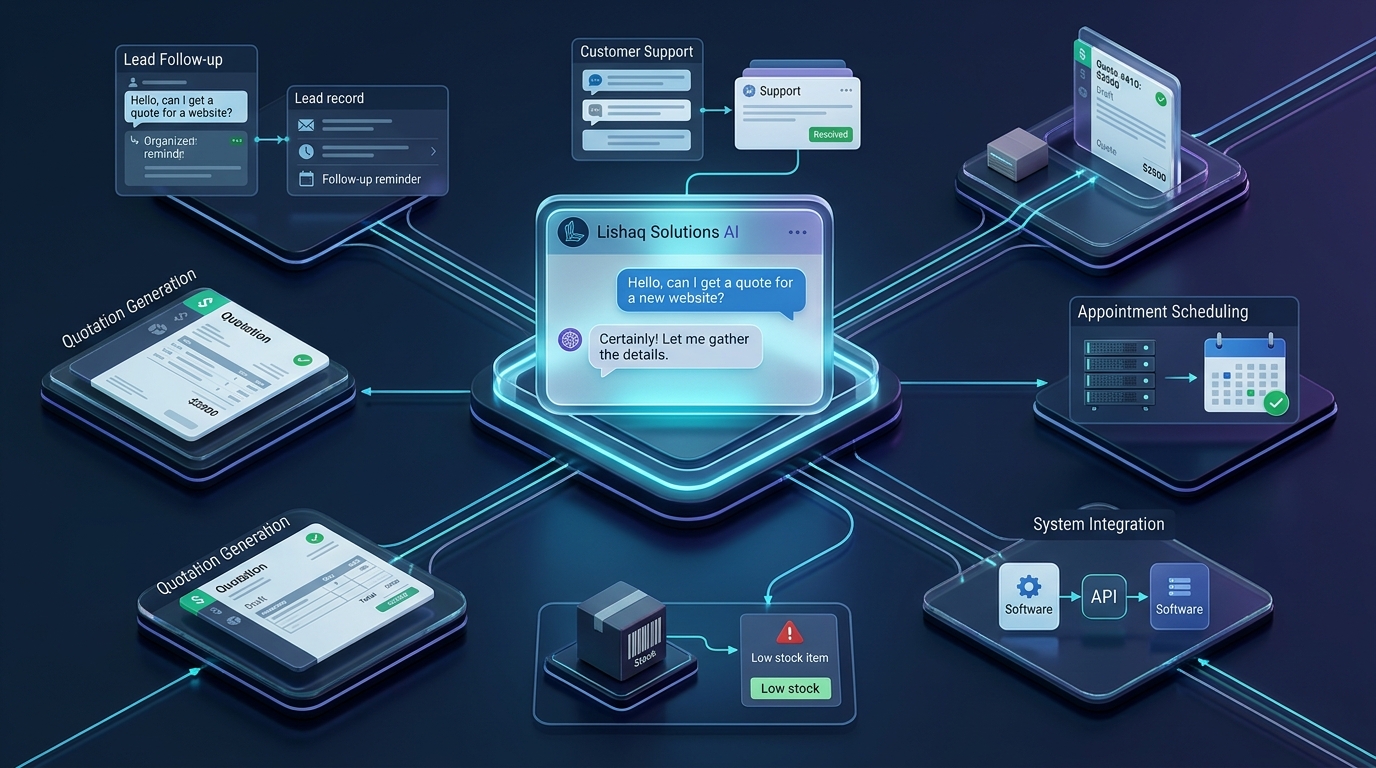
Many small businesses do not have a shortage of tools. They have a problem with how those tools work together.
A customer submits an enquiry on a website, another sends a message on WhatsApp, and a third asks for a quotation by email. Someone has to collect the information, update a spreadsheet, notify the right employee, prepare a response and remember to follow up. Meanwhile, stock records, invoices and reports may live in completely separate systems.
This is where AI automation for small businesses can make a practical difference. Instead of asking employees to repeat the same administrative steps throughout the day, a well-designed workflow can move information between systems, trigger routine actions and bring important exceptions to a person's attention.
The objective is not to automate everything or replace human judgement. It is to remove unnecessary manual work, respond to customers more consistently and give your team better information for making decisions.
In this guide, we will explore seven business processes worth automating, explain where AI is useful, and show how to decide between an existing tool, an integration and custom business software.
Why Business Automation Matters in 2026
AI adoption among small businesses is no longer just a technology discussion. A 2026 U.S. Chamber of Commerce report found that 66% of U.S. small businesses were using AI, up from 23% in 2023. These figures describe U.S. businesses and should not be treated as a universal adoption rate, but they illustrate how quickly the technology is becoming part of business operations.
Adopting a tool, however, is not the same as integrating it into a reliable business process. The OECD's 2026 research on SMEs and AI identifies continuing challenges around skills, maintenance, cybersecurity and the effective integration of AI into business operations.
For a business owner, the practical question is not simply, "How can we use AI?" It is:
Which repetitive task is slowing the business down, what should happen automatically, and where should a person remain in control?
1. Automate Website Enquiries and Lead Management
When a potential customer contacts your business, the information should reach the right person without depending on someone manually checking several inboxes.
Consider a service company that receives enquiries through its website, email and messaging channels. Each enquiry may contain a different level of detail, and some potential customers may never receive a timely response.
What an automated lead workflow looks like
- A customer submits an enquiry form or contacts an approved messaging channel.
- The system records the customer's name, contact details, service of interest and message.
- The enquiry is added to a central lead-management system or CRM.
- The customer receives a confirmation, and the responsible team member is notified.
- A follow-up task is created if the enquiry remains unanswered.
AI can add another layer by classifying enquiries, summarising long messages or identifying the service a customer appears to need. The underlying workflow should still validate the information and assign clear ownership.
Business benefit: Fewer enquiries get lost between communication channels, and staff can see what needs attention.
Suitable solutions: Website forms, CRM integrations, messaging integrations, lead dashboards and automated notifications.
2. Automate Lead Qualification and Follow-Ups
Not every enquiry is ready for a sales conversation. Some people want pricing, others need technical information, and some are still exploring their options.
A structured workflow can collect the details required to decide what should happen next, rather than leaving the sales team to reconstruct every conversation manually.
Example workflow
- Ask new leads about their needs, budget range, preferred timeline and relevant requirements.
- Organise responses in the CRM or lead dashboard.
- Assign the enquiry according to service type, location or availability.
- Schedule a follow-up when a required response or decision is missing.
- Alert a human team member when the customer is ready for a detailed discussion.
AI can help summarise responses and suggest a priority category. The rules that control assignment, contact permissions and follow-up timing should be explicit. Avoid sending repeated or unwanted messages simply because an automation is technically possible.
Business benefit: Sales teams spend less time organising enquiries and more time responding to suitable prospects.
3. Build a Customer Support Chatbot With a Human Handoff
Many businesses answer the same questions repeatedly: What are your working hours? Which services do you offer? How can a customer book an appointment? What information is needed for a quotation?
A well-designed chatbot can answer approved questions, collect relevant details and guide customers toward the next step. An AI-powered chatbot can also interpret a question phrased differently from the wording in the knowledge base.
What the chatbot should do
- Answer common questions using approved business information.
- Direct visitors to relevant services, product pages or contact forms.
- Collect details needed for a support request or quotation.
- Summarise the conversation when transferring it to an employee.
- Clearly escalate uncertain, sensitive or unusual questions.
The quality of a chatbot depends on the accuracy of its information and the boundaries placed around its answers. It should not invent prices, guarantee service availability or make commitments that your business has not approved.
It should also be clear to customers when they are interacting with an automated system. Provide an accessible way to reach a person when the bot cannot help.
Business benefit: Customers can find routine information more easily, while employees retain control of cases that require judgement.
Suitable solutions: Website chatbots, AI assistants connected to an approved knowledge base, support-ticket workflows and CRM integration.
4. Automate Quotations, Proposals and Approvals
For businesses that prepare quotations regularly, manual document creation can become a bottleneck. Staff may repeatedly copy customer details, select products or services, calculate totals, apply approved taxes and format the same document.
A quotation workflow can turn those separate steps into one structured process.
A practical quotation workflow
- Capture the customer's requirements through a form, CRM or sales dashboard.
- Select the appropriate products or services from an approved catalogue.
- Calculate quantities, prices, discounts and applicable taxes using deterministic business rules.
- Generate a quotation using an approved template.
- Send the draft to an authorised employee when approval is required.
- Record the quotation number, status, issue date and follow-up date.
AI can help summarise a customer's request or extract details from a document. It should not silently determine binding prices or contractual terms. Financial calculations should use tested application logic, and an authorised person should approve quotations where necessary.
Business benefit: A more consistent quotation process, better visibility into outstanding proposals and fewer opportunities for manual data-entry mistakes.
Suitable solutions: Quotation management software, CRM integration, document generation, approval workflows and custom sales dashboards.
5. Connect Orders, Inventory and Low-Stock Alerts
Inventory problems are often data-flow problems. Sales, purchasing and stock records may be updated in different places, leaving employees unsure which quantity is correct.
A connected point-of-sale or inventory system can record transactions and update stock quantities in a central place. It can also evaluate predefined reorder thresholds and notify the responsible person when attention is needed.
Example inventory automation
- A sale or approved stock movement updates the relevant inventory record.
- The system recalculates the available quantity.
- If stock reaches a configured threshold, the system creates a low-stock alert.
- A purchase suggestion is prepared using the configured rules.
- An authorised employee reviews and approves the purchase order.
The same approach can help businesses that manage several product categories, warehouses or branches. The specific design depends on how stock is received, sold, transferred, returned and corrected.
AI may help analyse demand patterns or flag unusual changes, but basic stock calculations and transaction records should remain consistent and auditable.
Business benefit: Better stock visibility, fewer manual updates and a clearer process for purchasing decisions.
Suitable solutions: POS software, inventory management systems, barcode workflows, API integrations and reporting dashboards.
6. Automate Invoice Reminders and Routine Notifications
Businesses frequently spend time checking due dates, sending reminders and asking employees to confirm the status of routine tasks. These activities may be simple individually, but repeated manual handling adds up.
A reminder workflow can use defined dates, statuses and rules to trigger the next action.
Examples
- Notify a customer before an appointment or scheduled service.
- Remind an authorised employee that an invoice is approaching its due date.
- Prepare a payment reminder for review and send it through an approved channel.
- Notify staff when a required document has not been received.
- Escalate an overdue task to its assigned owner or manager.
For financial workflows, connect the system to a reliable payment status source. Never treat a sent reminder as proof of payment, or allow an unverified AI response to alter financial records. Keep an audit trail of important status changes.
Business benefit: More consistent follow-up and clearer ownership of routine administrative tasks.
7. Turn Business Data Into Useful Management Reports
Owners often need answers to straightforward questions: Which services generate the most enquiries? How many quotations are still pending? Which products are running low? What work is overdue? How are sales changing over time?
When each answer requires collecting information from separate spreadsheets, emails or applications, reporting becomes slow and inconsistent.
A management dashboard can bring approved data sources together into a shared view.
What the dashboard might include
- New enquiries, assigned leads and follow-up status.
- Quotation totals, approval status and outstanding proposals.
- Sales figures and inventory alerts.
- Open support requests and overdue tasks.
- Selected performance trends over daily, weekly or monthly periods.
AI can help summarise trends or turn a question into a draft report, but the dashboard still needs reliable data definitions. For example, the business should decide precisely how it counts a qualified lead, a completed sale or an overdue quotation.
Use role-based permissions so employees see the information needed for their work, while sensitive financial or customer data remains appropriately restricted.
Business benefit: Managers spend less time collecting reports and gain a clearer picture of where attention is needed.
How to Choose the Right Process to Automate First
The best first automation is not necessarily the most impressive AI feature. It is usually a frequent, well-understood task that creates noticeable delays, unnecessary data entry or avoidable mistakes.
Evaluate potential workflows using these questions:
| Question | What to look for |
|---|---|
| How often does it happen? | Daily or repeated tasks may offer more opportunities for improvement than rare events. |
| How much manual effort does it require? | Repeated copying, status checking, document preparation or follow-up. |
| What happens when it goes wrong? | Lost enquiries, incorrect records, delays, customer frustration or financial exposure. |
| Can the process be described clearly? | Known inputs, business rules, responsible people and expected outcomes. |
| Can the result be measured? | Processing time, error rate, response time, missed follow-ups or overdue tasks. |
| What are the risks? | Personal data, financial decisions, access permissions and customer communication. |
Consider an illustrative example: if an employee spends 10 minutes handling each of 40 repetitive tasks per week, that represents 400 minutes, or about 6 hours and 40 minutes of handling time. This is not a promised saving. The actual improvement depends on how much work the automation can safely remove and how much monitoring or exception handling remains.
Measure the current process first, then compare the results after the new workflow has been tested in real operating conditions.
Should You Use an Automation Tool, an Integration or Custom Software?
You do not need a large custom software project for every automation problem. The right choice depends on how standard your process is and how well your existing systems support it.
Option 1: Use an existing tool
Choose an existing product when the workflow is standard, the required features are already supported, and its cost, permissions and limitations fit your needs.
This can be appropriate for common scheduling, basic customer communication, simple forms, notifications or routine task management.
Option 2: Connect your existing applications
Use an integration or API workflow when your business already has suitable tools but information does not move between them properly.
For example, a website enquiry might need to create a CRM record, notify the correct employee and schedule a follow-up task without someone entering the same details repeatedly.
Option 3: Build custom business software
Custom development becomes more relevant when your business has specialised rules, complex approvals, unusual pricing, multiple connected modules, detailed reporting or requirements that existing products cannot handle cleanly.
A tailored business application might combine customers, products, quotations, stock, sales, invoices and reporting in one controlled workflow. It can be built around how your business operates instead of forcing every department to follow a generic process.
The trade-off is that custom software requires design, development, testing, maintenance and ongoing responsibility. It should solve a clearly identified business problem, not simply recreate features that an affordable existing tool already handles well.
Where Does AI Fit Into Business Automation?
Traditional automation is generally best when the rules are explicit. If a stock quantity drops below a defined threshold, for example, software can evaluate the condition and generate an alert consistently.
AI is more useful for tasks involving less structured information, such as summarising a message, classifying an enquiry, extracting information from a document or drafting a response from approved business material.
A useful design combines the two:
- Receive information: A customer submits a request or an event occurs.
- Interpret where necessary: AI extracts or summarises relevant details.
- Validate: The application checks required fields, permissions and business rules.
- Perform the appropriate action: A workflow updates a record, creates a task or prepares a draft.
- Escalate exceptions: A person reviews uncertain or consequential decisions.
- Record the outcome: The system keeps appropriate logs so the process can be checked later.
This separation helps prevent a language model from becoming the unchecked authority for prices, inventory, payments or sensitive customer decisions.
Security Rules Every Business Should Follow
Automation must not create a shortcut around good security practices. Before connecting AI services or business applications, review:
- Data access: Give each integration or automated agent only the permissions it requires.
- Privacy: Check which customer or business information is sent to external services and how it is handled.
- Human approval: Require review for high-impact actions, financial commitments and sensitive communications where appropriate.
- Error handling: Alert a responsible person when a workflow fails rather than silently dropping the task.
- Auditability: Record important updates and keep a clear history of consequential actions.
- Testing: Test unusual inputs, duplicate events, unavailable services, permission failures and incorrect AI responses.
The Australian government's guidance on using AI securely in business also recommends limiting access, understanding permissions and retaining oversight of important actions.
A Practical Roadmap for Your First Automation Project
You can approach a first project in manageable stages rather than attempting to transform the entire business at once.
Stage 1: Map the current process
Write down what triggers the process, which information is required, who handles each step, where delays occur and what happens when something goes wrong. Include the tools and spreadsheets currently involved.
Stage 2: Define the desired outcome
Specify what the system should do automatically and what still requires a person. Choose a baseline measure, such as time spent per quotation, enquiry response time or the number of overdue follow-ups.
Stage 3: Select the smallest useful solution
Determine whether existing software, an API integration, a custom dashboard or an AI feature is actually necessary. Start with one workflow that is narrow enough to test properly.
Stage 4: Test realistic situations
Test normal requests as well as missing information, duplicate submissions, rejected approvals and service failures. Confirm that sensitive actions require the intended permissions and that errors reach a responsible person.
Stage 5: Measure and improve
Compare performance with the original process. Check whether the automation reduced manual steps, improved consistency or made issues easier to identify. Refine the workflow before expanding it to other departments.
How Lishaq Solutions Can Help
Every business has a different mix of tools, processes and operational problems. Some need a better website enquiry workflow. Others need customer management, quotations, inventory, a reporting dashboard or integrations between existing applications.
Lishaq Solutions helps businesses connect their workflows through web development, custom business software, dashboards, API integrations and AI-powered automation. The right solution depends on your existing systems, actual requirements and the problem you need to solve.
If your team regularly copies data between applications, misses follow-ups, prepares documents manually or struggles to see what is happening across the business, start by identifying the process that causes the most friction.
Discuss your automation project
When you contact us, explain the task you want to improve, the tools your team already uses and what currently takes the most time. That gives us a practical starting point for deciding whether an existing tool, an integration or custom software is the best fit.
Final Thoughts
AI automation is most useful when it improves a real business process rather than adding another disconnected tool. Start with repetitive work, establish clear rules, connect information carefully and keep people involved wherever accuracy, judgement or accountability matters.
You do not need to automate everything at once. One reliable workflow—with a measurable result—is a better starting point than a complex system nobody trusts.