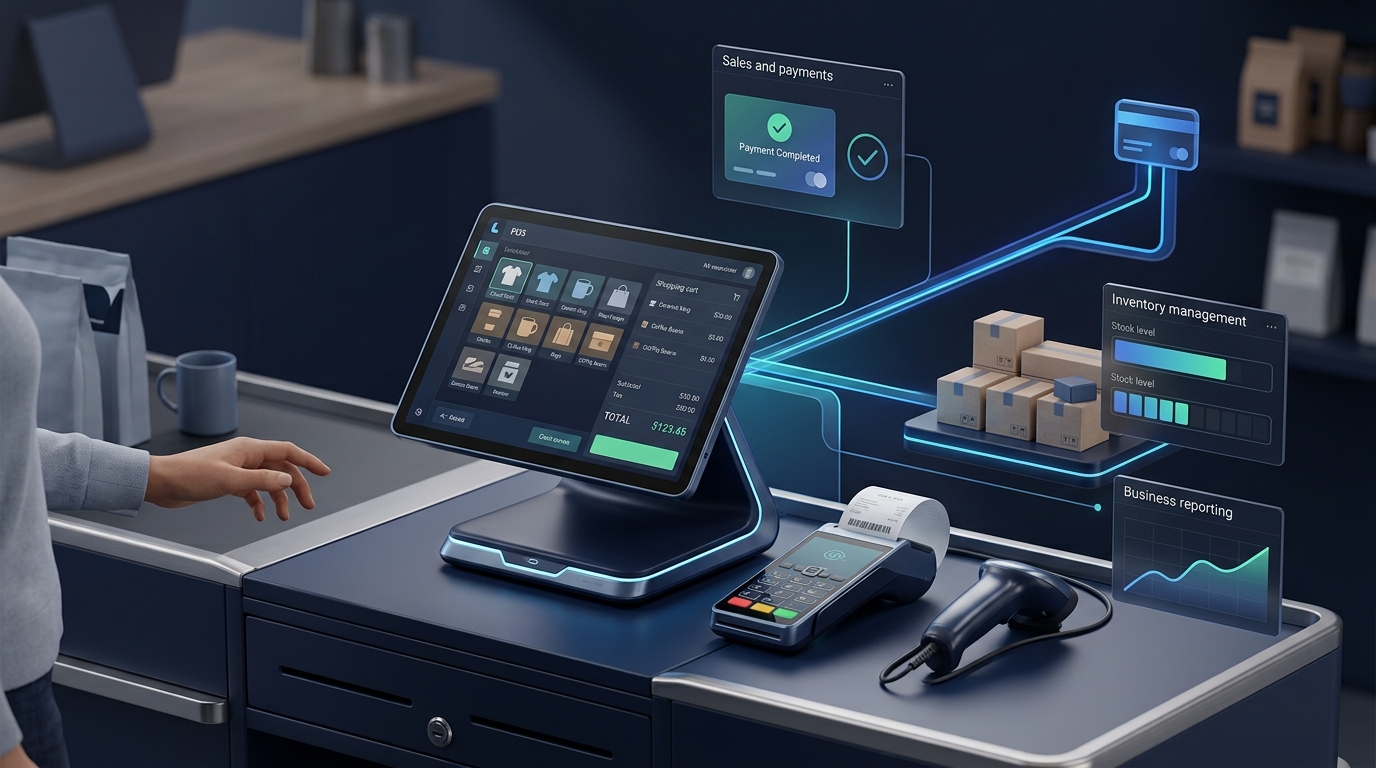
A sale should be simple: select the products, calculate the total, accept payment and update the stock. But when a business relies on disconnected spreadsheets, manual calculations and separate inventory records, even a routine transaction can create unnecessary work.
This is where POS software for small businesses makes a difference. A modern point-of-sale system can do much more than generate a receipt. It can connect sales, product management, inventory, staff activity, customer records and reporting in a single workflow.
However, choosing a POS system is not as simple as selecting the cheapest plan or buying a touchscreen terminal. Different businesses need different features, integrations, hardware and levels of control.
In this guide, you will learn how POS software works, which features matter most, what affects the total cost, how cloud and offline systems differ, and when custom POS software may be a better fit than an existing product.
What Is a POS System?
A point-of-sale (POS) system is the combination of software and, where needed, hardware used to complete sales transactions and manage the information associated with those sales.
A typical POS setup may include a computer or touchscreen terminal, a barcode scanner, a receipt printer, a cash drawer and a payment terminal. The exact hardware depends on the business and the payment methods it accepts.
The software brings these components together. It identifies products, calculates totals, records transactions, updates stock according to the configured workflow and produces sales reports.
For example, when a cashier scans a product, the POS retrieves its name and selling price. After the sale is completed, the system records the transaction and adjusts the corresponding inventory quantity. A manager can then review the transaction and see how it affects sales and stock.
A basic POS focuses on checkout. A more complete retail management system may also include supplier records, purchase orders, stock transfers, returns, customer histories, employee permissions and multi-branch reporting.
Why Do Small Businesses Need POS Software?
Many businesses begin with a cash register or spreadsheet because it is inexpensive and easy to understand. The problem appears when transaction volumes increase, more employees need access, or stock must be managed across different locations.
1. Faster and more consistent checkout
Product search, barcode scanning and automatic calculations help staff process transactions without repeatedly looking up prices or calculating totals manually. The improvement depends on the system, hardware and staff training, but a well-designed checkout workflow can remove unnecessary steps.
2. Better inventory visibility
When completed sales update stock records correctly, staff can see the recorded quantity of each product without relying entirely on separate spreadsheets. Low-stock alerts and stock movement reports help managers decide what needs attention.
3. More useful sales reports
Instead of manually combining receipts at the end of the day, managers can review recorded transactions by date, product, category, cashier or branch, depending on the system's capabilities.
4. More control over staff activity
Role-based permissions can restrict access to sensitive features such as refunds, discounts, price changes and sales reports. A transaction history can also help managers investigate unexpected changes.
5. A clearer view of business performance
When sales, returns, purchases and inventory are recorded consistently, business owners can make decisions using more reliable information. Reporting quality still depends on correct data entry, sensible business rules and a suitable system configuration.
Essential POS Software Features to Look For
Not every business needs an enterprise management platform. The best starting point is a dependable checkout process, accurate records and the features required for your daily operations.
1. Product and category management
The system should allow authorised staff to create products, organise categories, set selling prices and maintain identifiers such as SKUs and barcodes.
If your business sells clothing or accessories, you may need product variations such as size, colour or model. A pharmacy or grocery business may have different requirements for batch details, expiry dates, units of measure or weighing.
2. Barcode scanning and quick product search
A barcode scanner can identify a product using its registered barcode. For products without barcodes, staff should still be able to search by name, SKU or another suitable identifier.
Check how the system handles duplicate barcodes, products with variations and products that have been discontinued. Good search and product-selection behaviour matters just as much as the scanning hardware.
3. Checkout, payments and receipts
A POS should calculate line totals, discounts, applicable taxes and transaction totals according to the business's approved rules. It should also record payment methods and generate a suitable receipt or invoice.
Cash, card payments, bank transfers and other payment options depend on the business, country and payment provider. Verify that any payment terminal integration actually works with the provider you intend to use.
Important: POS software is not automatically a payment processor. Some systems simply record that payment was received, while others integrate with a supported payment service to initiate or confirm a transaction.
4. Real-time inventory updates
Inventory tracking is one of the most important features to evaluate. When a sale is finalised, the system should update the relevant stock record according to its defined transaction rules.
Look for support for:
- Current stock quantities and stock adjustments.
- Goods received from suppliers.
- Returns, damaged items and stock corrections.
- Low-stock thresholds and reorder alerts.
- Stock movement history.
- Transfers between branches or warehouses, if required.
Inventory should not be reduced twice because of a repeated request, and cancelled or refunded transactions should follow a clearly defined adjustment process. These details are important when sales are recorded by multiple employees or terminals.
5. Purchases and supplier management
Businesses that regularly replenish products may benefit from supplier records, purchase orders, receiving workflows and supplier purchase history.
For example, a manager could create a purchase order, receive the delivery and update stock quantities only after verifying what actually arrived. This provides a clearer distinction between goods ordered and goods received.
6. Returns, refunds and discounts
A practical POS system should have defined procedures for returned goods, partial refunds, order cancellations and approved discounts. It should preserve a traceable transaction history rather than silently modifying completed sales.
Depending on the business, managers may also need refund reasons, approval requirements and restrictions on which employees can change prices.
7. Staff accounts and permissions
Each employee should use an appropriate account instead of sharing one administrator login. Permissions can separate cashier activities from management tasks such as stock adjustments, user management and financial reporting.
Where accountability matters, record important actions with the employee, timestamp and relevant transaction reference.
8. Reports and dashboards
A useful dashboard should make important operational information easy to understand without forcing managers to export several spreadsheets.
Depending on the business, relevant reports may include:
- Daily sales and transaction counts.
- Sales by product, category, cashier and location.
- Returns, discounts and cancelled transactions.
- Current stock and low-stock items.
- Purchase history and supplier activity.
- Payment-method summaries and cash reconciliation.
Be careful with the word profit. Sales revenue is not profit, and gross profit calculations require reliable product costs and a consistent treatment of returns, discounts and other relevant adjustments.
What Features Does Your Type of Business Need?
The right POS system depends on what you sell and how you operate. A generic checkout application may not handle every industry-specific workflow well.
| Business type | Important requirements to consider |
|---|---|
| Retail and clothing stores | Barcode scanning, size and colour variations, returns, discounts and stock visibility. |
| Supermarkets and grocery stores | Fast checkout, weighing support where needed, unit-based pricing, stock adjustments and cashier management. |
| Pharmacies | Batch and expiry tracking where applicable, product traceability, controlled permissions and jurisdiction-specific workflows. |
| Electronics and mobile shops | Serial numbers or IMEI records where needed, warranty details, product variations and supplier information. |
| Restaurants and cafés | Menus, modifiers, table or order management, kitchen tickets and ingredient tracking where required. |
| Wholesalers and distributors | Bulk quantities, customer-specific pricing, credit records, purchase management and warehouse transfers. |
Industry requirements can extend beyond these examples. For example, tax invoicing, pharmacy regulations, fiscal devices and mandatory reporting vary by jurisdiction. Verify local requirements before selecting or building a system.
Cloud POS vs. Offline POS: Which Is Better?
One of the most important decisions is how the system behaves when the internet connection becomes unreliable.
Cloud-based POS
A cloud-based system stores or synchronises important business records through online services. Depending on the product, authorised managers may be able to view business activity remotely and access information shared across branches.
Potential advantages include centralised administration, remote reporting and simpler access to shared records. The trade-offs may include subscription costs, dependence on internet connectivity for certain features and the need to understand the vendor's backup, export and account-access policies.
Offline or locally operated POS
A locally operated system may keep important data on a store computer or use a local database. Depending on its design, it may continue recording certain sales when internet access is unavailable.
However, offline capability must be verified rather than assumed. Some cloud systems support limited offline transactions, while others require connectivity for specific functions. Payment authorisation, inventory synchronisation and multi-branch updates may behave differently while disconnected.
Which should you choose?
A single small shop with unreliable internet may prioritise a tested offline workflow. A business operating multiple branches may prefer centralised data and synchronisation. Some businesses need a hybrid arrangement.
Before buying a system, ask the vendor to demonstrate what happens when the internet fails during checkout, when two terminals sell the same item, and when the connection returns. Find out how the system handles conflicts, failed payments and unsynchronised transactions.
How Much Does POS Software Cost?
There is no single price that applies to every POS implementation. The total cost depends on the software, hardware, number of users or terminals, integrations, required features and ongoing support.
Rather than comparing only a headline monthly subscription, evaluate the full cost of operating the system over its expected useful life.
1. Software or licence fees
Some products use monthly or annual subscriptions. Others charge a one-time licence, a recurring maintenance fee or a combination of charges. Check which features are included in the selected plan.
2. Hardware
Depending on your workflow, you may need a computer or terminal, barcode scanner, receipt printer, cash drawer, customer display or payment terminal. Confirm device compatibility before purchasing equipment.
3. Setup and data migration
Initial setup can involve entering products, importing existing records, configuring taxes, setting permissions, preparing receipt formats and training staff. Older or inconsistent spreadsheets may require additional cleanup before import.
4. Payment processing and integrations
Payment-provider charges, accounting connections, ecommerce integrations and specialised hardware can affect the total cost. Check whether additional transaction fees or third-party subscriptions apply.
5. Maintenance and support
Budget for backups, updates, security fixes, technical assistance, staff training and recovery procedures. If the system is custom-built, clarify who maintains the software and what support is included.
A practical way to compare the total cost
For a fair comparison, estimate the following for each option:
- Initial setup, data import and hardware.
- Software, hosting or licence fees.
- Payment and integration charges.
- Training and support.
- Maintenance and likely future changes.
Compare these costs over the same time period and for the same number of locations, terminals and required features. A low starting price does not necessarily mean the lowest long-term cost.
Ready-Made POS Software vs. Custom POS Software
For many small businesses, an existing POS product is the simplest and most economical starting point. But some businesses have operational requirements that generic products cannot handle without workarounds or several disconnected applications.
When ready-made POS software makes sense
Choose an existing product when its features match your workflow, the required payment services and hardware are supported, its reports are sufficient, and its commercial terms fit your business.
It is especially worth considering when you need to start quickly and your processes follow common retail or restaurant patterns.
When custom POS software may be a better fit
Custom development may be worth evaluating when your business needs specific pricing rules, approval stages, specialised inventory processes, integration with existing systems, custom reporting or a workflow that available products cannot support efficiently.
A custom POS application can be designed around the business's actual operations. Depending on requirements, it may include:
- Product, category and barcode management.
- Sales, returns, payments and receipt generation.
- Inventory, supplier purchases and stock movements.
- Customer records, credit workflows or loyalty features where appropriate.
- Staff permissions and activity records.
- Management reports and dashboards.
- Integration with accounting, ecommerce or other business applications.
Custom software also comes with responsibility. It must be tested, secured, backed up and maintained. A custom build is not automatically cheaper or better than a commercial product; the value comes from solving requirements that matter enough to justify the investment.
How to Calculate Whether a POS System Is Worth It
Consider a simple illustrative example. Suppose staff spend a combined 30 minutes each day reconciling sales and correcting inventory records. A more integrated workflow might reduce some of this work.
To estimate the operational value, first measure the current process. Then estimate the time that could realistically be saved and account for ongoing system costs. Do not treat every minute saved as guaranteed cash savings; the actual benefit depends on how the time is used and whether the changes reduce real business costs.
Also consider less direct improvements, such as more reliable stock information, easier reconciliation, fewer missed transactions and faster access to reports. These should be measured where possible instead of assigned made-up monetary values.
How to Choose the Right POS System: A Buyer Checklist
Before signing a contract or commissioning custom software, answer these questions:
- Products: Can it handle your SKUs, barcodes, variations, units and required product details?
- Checkout: Can staff complete a normal sale quickly and handle returns or approved discounts correctly?
- Inventory: How are sales, purchases, returns and stock adjustments reflected in stock records?
- Payments: Are your intended payment methods and providers actually supported?
- Connectivity: What works offline, and how are records synchronised afterwards?
- Security: Can you define staff roles, restrict sensitive actions and review important activity?
- Reports: Can you obtain the sales, inventory and management information you actually use?
- Integrations: Does it connect with your existing accounting, ecommerce or business software?
- Data ownership: Can you export your important records in a usable format?
- Continuity: What are the backup, recovery, update and technical support arrangements?
- Total cost: What will you pay for setup, hardware, subscriptions, integrations and support?
Ask for a demonstration using a realistic workflow from your own business. A successful demo should cover ordinary sales as well as exceptions such as a return, a cancelled order, an unavailable product and a failed connection.
Common POS Implementation Mistakes to Avoid
Choosing software before mapping the workflow
List how products arrive, how sales are completed, how stock is corrected and how returns are handled before choosing a system. This prevents discovering essential requirements after implementation.
Ignoring data migration
Incorrect product codes, duplicated records and inconsistent stock quantities can cause trouble from the first day. Clean and validate your existing records before importing them.
Giving every employee administrator access
Use individual accounts and appropriate permissions. Refunds, price changes, stock corrections and user administration often require different levels of access.
Failing to test backups and recovery
A backup is only useful if the data can be restored. Establish who is responsible for backups and test recovery procedures before depending on the system for everyday operations.
Overlooking training and support
A feature-rich POS can still fail operationally if employees do not know how to use it. Prepare simple procedures for checkout, returns, shift closing, stock corrections and what to do when a device or connection fails.
How Lishaq Solutions Can Help With Custom POS Software
The right system should fit the way your business sells, manages stock and makes decisions. For some businesses, an existing POS product is ideal. Others need software that connects sales, inventory, purchases, customers and reporting in one tailored workflow.
Lishaq Solutions provides web development and custom business software services, including POS, inventory management and administrative dashboards. We can help evaluate your workflow and determine whether a ready-made product, an integration or a custom application is the sensible approach.
A custom project can begin with a focused set of requirements rather than attempting to build every feature at once. For example, the first phase might cover product management, checkout, receipt generation, stock updates and essential reports. Additional modules can be prioritised after the core workflow has been tested.
Before planning a project, identify the number of locations, expected users, existing product records, required hardware, payment methods, offline requirements and reports your team relies on. These details determine the scope and help produce a realistic proposal.
Planning a POS system for your business? Discuss your POS software requirements
Tell us what type of business you operate, what you currently use for sales and inventory, and which problems you want to solve. This creates a practical starting point for discussing the appropriate solution.
Frequently Asked Questions About POS Software
What is the difference between a POS system and POS software?
POS software is the application that manages checkout and related records. A POS system can refer to the complete setup, including the software, computer or terminal, barcode scanner, receipt printer and compatible payment hardware.
Can POS software manage inventory automatically?
Many POS systems update inventory when sales are completed. The quality and scope of tracking depend on the product configuration and supported workflows. Purchases, returns, damaged stock, transfers and manual corrections still need proper handling.
Does a POS system need an internet connection?
It depends on the system. Some functions may work offline, while other functions—including certain payment methods or remote synchronisation—may require connectivity. Ask the vendor to demonstrate the exact offline behaviour you need.
Is cloud POS better than offline POS?
Neither is automatically better for every business. Cloud systems can simplify centralised access and multi-location reporting. Locally operated or hybrid systems may offer more control over certain local workflows. Connectivity, backup, synchronisation, security and operational requirements should guide the decision.
How much does custom POS software cost?
The cost depends on the number of modules, business rules, integrations, interfaces, hardware requirements, security controls and support arrangements. A useful estimate requires a defined scope and a decision about what the first release must include.
Can POS software work across multiple branches?
Some products support multiple locations and shared reporting. Verify how stock transfers, user permissions, transaction records and synchronisation work across branches before selecting a system.
Can POS software connect with an online store?
Some POS systems integrate with ecommerce platforms so that supported product, order and inventory records can be shared. Confirm which data synchronises, how quickly updates occur and how conflicts or failed synchronisations are handled.
Final Thoughts
A POS system should do more than process a payment. The right solution helps a business record sales accurately, maintain better inventory information, control staff access and understand daily operations.
Start by mapping your actual requirements, compare the complete cost of each option, and test important workflows before committing. Choose ready-made software when it meets your needs. Consider custom POS development when specialised business rules or integration requirements justify it.
The objective is not to buy the system with the longest feature list. It is to build a reliable process that makes selling, stock management and decision-making easier for your team.